> ## Documentation Index
> Fetch the complete documentation index at: https://bunnynet-cb9733c2-onclientmiddleware.mintlify.site/llms.txt
> Use this file to discover all available pages before exploring further.
# Creating a rate limit rule
> Customize Bunny Shield’s protections to throttle abuse, slow malicious bots, and absorb traffic spikes without affecting legitimate users.
Rate limit rules cap how many requests a client can make to your application within a defined window. Combine them with Shield's targeting controls to throttle abuse on specific endpoints without affecting legitimate traffic.
## What you'll need
Before you dive in, make sure you have the following prerequisites in place:
* A [bunny.net](https://bunny.net/) account ([Log in](https://dash.bunny.net/auth/login?pk_buttonlocation=menu) or sign up for a [free trial](https://dash.bunny.net/auth/register)).
* An existing Shield Zone.
* Advanced Plan or above on the existing Shield Zone (if creating more than 2 rate limit rules\*).
## Creating a rate limit rule
To create an effective rate limit rule, it's important to understand the fundamentals of how to build a Custom WAF Rule on Bunny Shield. Familiarize yourself with our [Rule Engine](/shield/rule-engine) documentation to gain insights into how rules are structured and processed within the system.
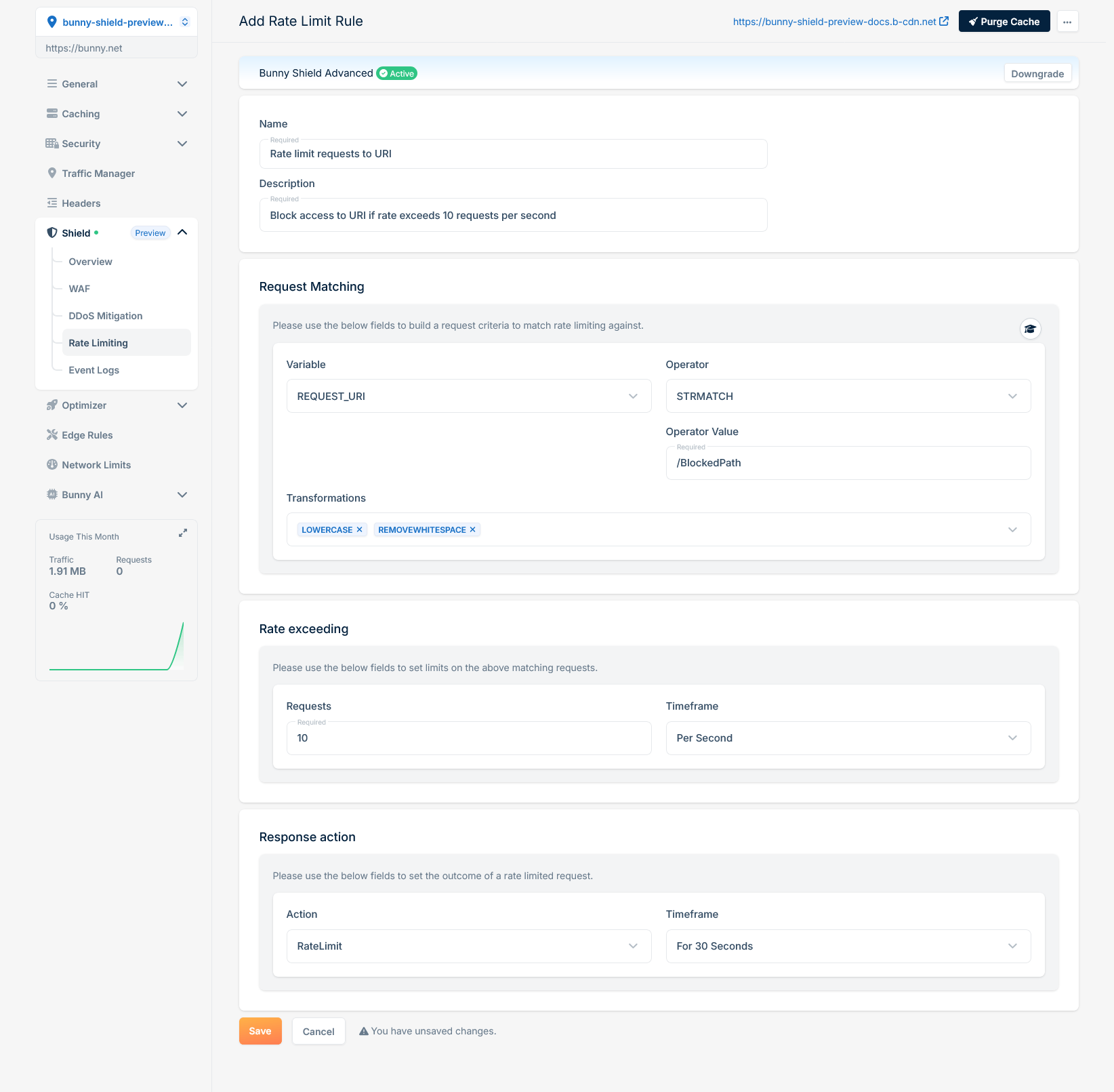 This rule processes each HTTP request by extracting only the REQUEST\_URI (**Variable**), converting it to lowercase, and removing whitespaces (**Transformations**). It then verifies if the transformed REQUEST\_URI matches exactly (**Operator**) with '/blockedpath’ (**Operator Value**). If a match is found, we increment the global rate limit counter. If the RequestCount (10 requests) is exceeded within the defined 1-second Timeframe, then our WAF Engine will block (**Response Action**) the request for the defined 30-second BlockTime, halting further rule processing and intercepting the request.
With the basics covered, you can write rate limit rules that mitigate the abuse patterns specific to your site.
## Examples
### Rate limit request if a cookie is set with a specific value and exceeds a defined limit
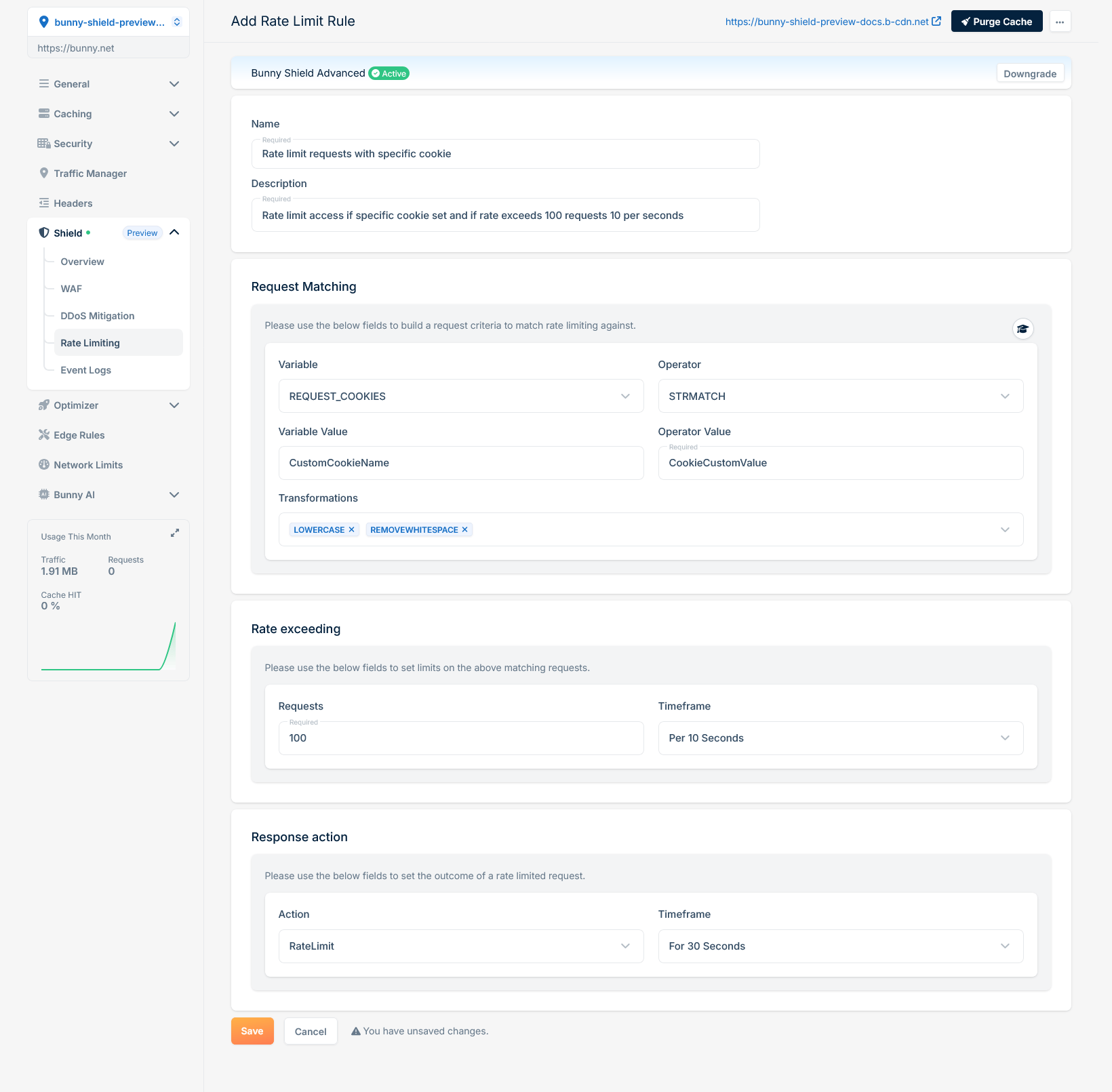
If you want to rate limit requests when a specific cookie is set to a certain value and the request rate exceeds a defined limit, you can use the following configuration:
This rule processes each HTTP request by extracting only the REQUEST\_URI (**Variable**), converting it to lowercase, and removing whitespaces (**Transformations**). It then verifies if the transformed REQUEST\_URI matches exactly (**Operator**) with '/blockedpath’ (**Operator Value**). If a match is found, we increment the global rate limit counter. If the RequestCount (10 requests) is exceeded within the defined 1-second Timeframe, then our WAF Engine will block (**Response Action**) the request for the defined 30-second BlockTime, halting further rule processing and intercepting the request.
With the basics covered, you can write rate limit rules that mitigate the abuse patterns specific to your site.
## Examples
### Rate limit request if a cookie is set with a specific value and exceeds a defined limit
If you want to rate limit requests when a specific cookie is set to a certain value and the request rate exceeds a defined limit, you can use the following configuration:
 ### Rate limit request if User-Agent is a known crawler and exceeds a defined limit
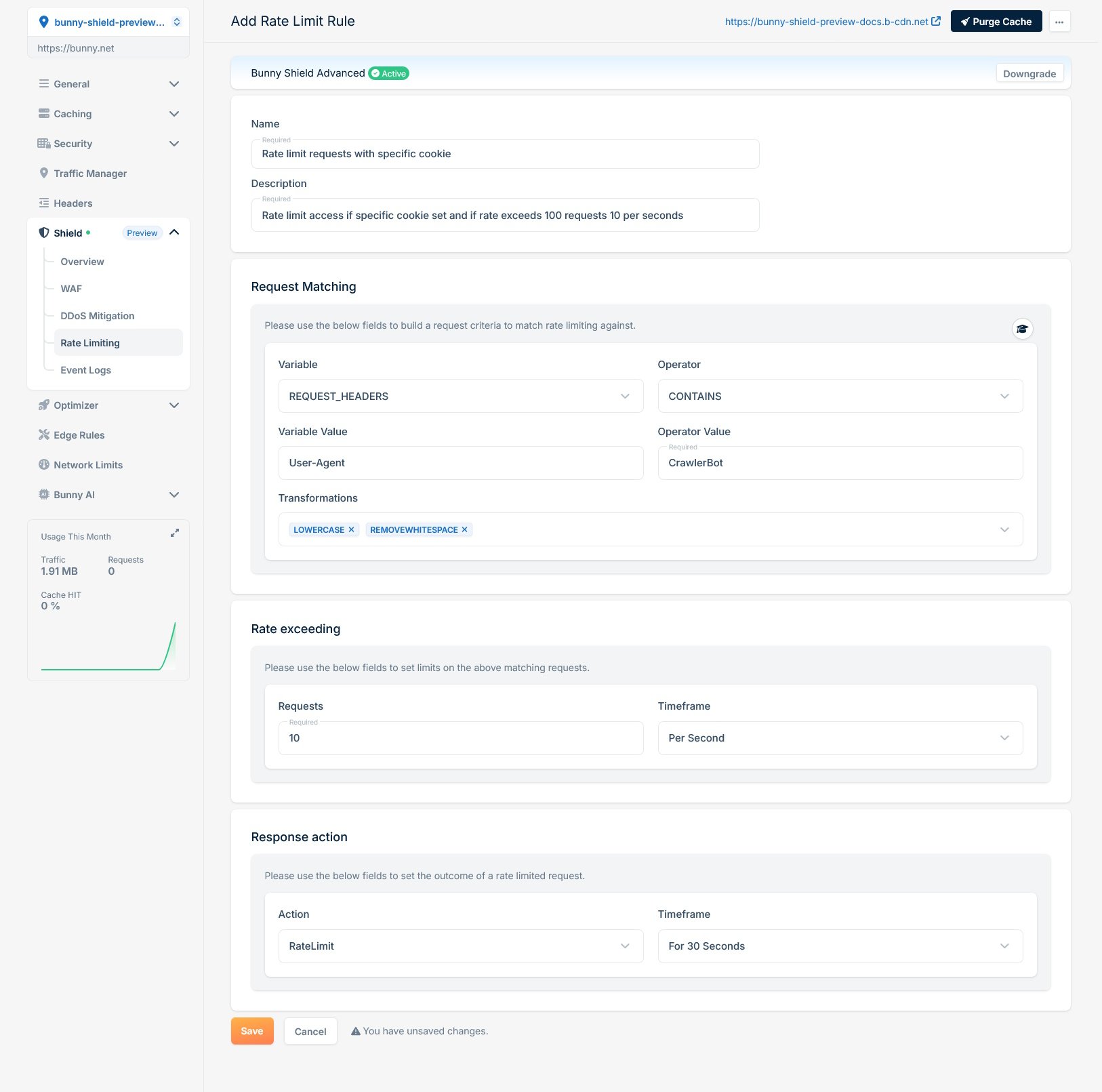
If you need to rate limit requests where the User-Agent header contains a known crawler identifier and the request rate exceeds a defined limit, use the following rule configuration:
### Rate limit request if User-Agent is a known crawler and exceeds a defined limit
If you need to rate limit requests where the User-Agent header contains a known crawler identifier and the request rate exceeds a defined limit, use the following rule configuration:
 ## Need help or encountering issues?
If you encounter any difficulties or have questions, our support team is here to assist you. Please don't hesitate to contact us via [support request form](https://bunny.net/contact/) for prompt assistance.
Our dedicated support team is ready to help you resolve any issues you might face during the deployment process, provide additional guidance, or answer your questions.
## Need help or encountering issues?
If you encounter any difficulties or have questions, our support team is here to assist you. Please don't hesitate to contact us via [support request form](https://bunny.net/contact/) for prompt assistance.
Our dedicated support team is ready to help you resolve any issues you might face during the deployment process, provide additional guidance, or answer your questions.